How to Dispute a Business Credit Report Error (All 3 Bureaus)
Business credit does not carry the same sweeping dispute protections personal credit does, which makes policing your own file even more important. Here is exactly how.
Company Base OS Research
Updated July 25, 2026 · 7 min read
In this article
Key takeaways
- 1.Errors, wrong tradelines, outdated balances, mistaken public records, can quietly lower your score and cost you approvals.
- 2.Each bureau has its own dispute channel. Dun & Bradstreet, Experian Business, and Equifax Business are separate files and are fixed separately.
- 3.Disputing with the furnisher, the vendor or lender that reported the bad data, in parallel often resolves it fastest.
- 4.Fix errors before you apply, not after a denial, and keep documentation of everything.
Unlike personal credit, business credit does not come with the same sweeping federal dispute protections, which makes policing your own file even more important. An uncorrected error is not just a wrong number sitting quietly in a database. It can be the specific reason an underwriter declines you or a supplier refuses terms. Here is how to find an error and get it fixed at every bureau that has it, plus the one step most owners skip entirely.
Step 1: Find the error
Pull your reports from all three bureaus and read them line by line against your own records. Look for accounts you do not recognize, wrong balances, payments marked late that were actually on time, and outdated or incorrect public records. Note each discrepancy with the specific wrong detail and the correct information, since a precise, documented dispute moves faster than a vague one. This is also a good moment to confirm your listed business name, address, and phone match across every file, since mismatches read as risk on their own.
Step 2: Dispute at each bureau separately
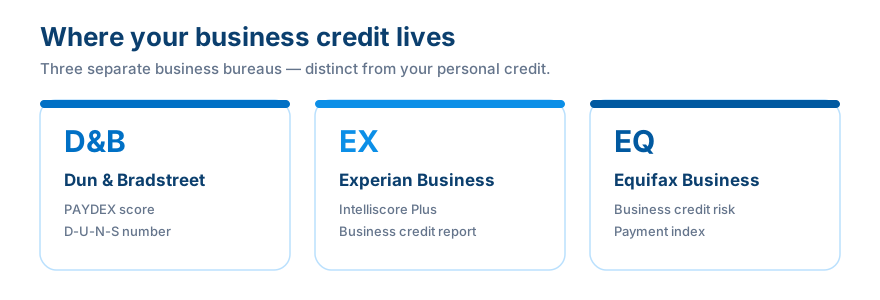
Because the three bureaus keep separate files, an error at one is not automatically wrong at the others, and fixing it at one does not fix it anywhere else. Check and dispute at all three.
- Dun & Bradstreet, make simple updates directly through their tools; for complex disputes, D&B offers phone support to report and investigate further.
- Experian Business, submit a dispute directly from your business report online, or send details through their business disputes channel.
- Equifax Business, handled through its dedicated business support channel rather than a consumer-style form. Submit your dispute with documentation there.
Verify the current channel first
Bureau phone numbers and email addresses change over time. Always confirm the current dispute path on the bureau's own business-credit site before you send anything.
Step 3: Dispute with the furnisher too
This is the step most owners miss entirely. The bureau did not invent the bad data, a furnisher, meaning the vendor, supplier, or lender that reported it, sent it in. Contacting that furnisher directly and asking them to correct what they reported often resolves the error faster than a bureau dispute alone, because once the source corrects its data, the bureau updates from it. Run both disputes, bureau and furnisher, in parallel rather than waiting on one before starting the other.
Step 4: Document and follow up
Keep a paper trail
- ✓Copies of every submission, document, and confirmation number
- ✓Clear supporting documentation, proof of payment, statements, with each dispute
- ✓A follow-up date logged for every open dispute
- ✓A fresh pull of your report afterward to confirm the correction actually posted
Common mistakes
Fixing only one bureau and assuming the rest are clean. Skipping the furnisher. Disputing vaguely instead of with specific, documented detail. Waiting until after a denial to check at all.
How this connects to building business credit
Building credit and protecting it are two sides of the same job. If an error misrepresents your payment history, the profile a lender sees is not the one you actually earned. Regular review and prompt disputes keep your file honest, which is exactly the kind of clean, consistent identity Company Base OS is built to help you maintain.
Business Fundability Score Calculator
How set up is your business foundation?
How many accounts are reporting to the business bureaus?
Where is your payment history / PAYDEX?
How many funding applications in the last 90 days?
Answer all four to see your estimated score.
Find out where you actually stand in 60 seconds
Take the free Business Fundability quiz. Answer seven questions and get your score out of 100, your single biggest blocker, and the exact first move to fix it.
Get my free Fundability ScoreFrequently asked questions
How do I dispute a business credit report error?
Pull your report from the bureau involved, document the specific error with correct details, submit a dispute through that bureau's business dispute channel, and contact the furnisher that reported the bad data directly at the same time.
Do I need to dispute at all three bureaus?
Only at the bureau or bureaus where the error actually appears, but check all three, since each keeps a separate file and an error at one does not mean the others are affected, or clean.
What is a furnisher?
The vendor, supplier, or lender that originally reported the data to the bureau. Correcting the error at the source often resolves it faster than a bureau dispute alone.
Does business credit have the same dispute rights as personal credit?
No. Business credit does not carry the same sweeping federal dispute protections personal credit does, which is exactly why proactively monitoring and disputing your own file matters so much.
An error left uncorrected does not just sit there quietly, it actively works against every application you make until someone fixes it. Make it you, and make it before the denial, not after.
Company Base OS
Stop reading about it. Get your exact next move.
CompanyBase reads your business credit file and hands you the one account to open next, and the exact day to apply. Start with your free Fundability Score.
Get my free Fundability Score →60 seconds · no credit pull · founding access just $7 today
Company Base OS Research
Company Base OS is an educational platform that helps business owners build business credit and get funded, in the right order. Our team tracks lender and bureau criteria so you always know your exact next move.
← Previous
How to Set Up Business Credit Monitoring (Free + Paid Options)
Next →
How to Check Your PAYDEX Score at Dun & Bradstreet