How to Set Up Business Credit Monitoring (Free + Paid Options)
Monitoring turns your business credit from something you check occasionally into something you actually watch. Here is exactly how to set it up.
Company Base OS Research
Updated July 25, 2026 · 6 min read
In this article
Key takeaways
- 1.Monitoring alerts you to changes across your bureau files so nothing surprises you at application time.
- 2.Free tools exist. D&B's CreditSignal shows and then alerts you to changes in your D&B scores at no cost.
- 3.Because the three bureaus are separate, ideal coverage watches all three, not just one.
- 4.Monitoring catches errors, fraud, and score drops early, while you can still act on them.
Building the file is only half the job. Monitoring is what confirms it is building correctly, and what warns you the moment something goes wrong. It surfaces three kinds of problems while you can still act on them: errors like a wrongly reported late payment, fraud like an account opened in your business's name without your knowledge, and score drops that signal something changed in how you are being reported. Any one of these can quietly derail a funding application, and the earlier you know, the more you can do about it.
Step 1: Start with the free D&B tool
The easiest free starting point is Dun & Bradstreet's CreditSignal. It shows your PAYDEX and several other D&B scores for an initial period, then sends alerts when those scores change direction, all at no cost. Since D&B is the bureau many suppliers and lenders check first, this is the highest-value free layer to turn on immediately.
- Go to Dun & Bradstreet's small business credit site and find CreditSignal.
- Create your free account and verify your business identity.
- Review your current D&B scores, then turn on change alerts.
Free covers D&B
To monitor Experian Business and Equifax Business too, you generally add a paid product from that bureau or a third-party service that spans multiple bureaus in one dashboard.
Step 2: Add coverage for the other bureaus
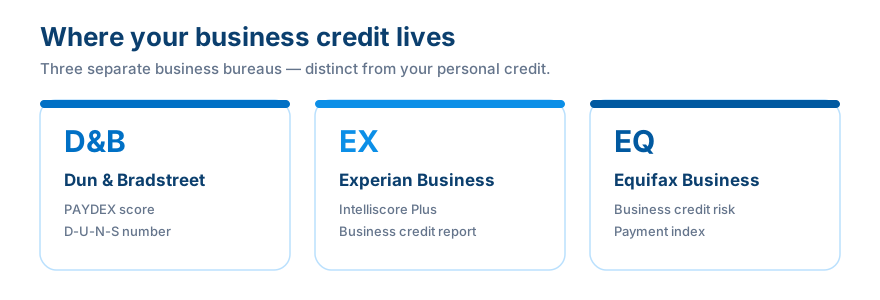
Because each of the three bureaus keeps a completely separate file, watching only one leaves real blind spots. There are two main routes from here: subscribe to each bureau's own monitoring product individually, or use a third-party service that aggregates multiple bureaus into a single dashboard with alerts. Weigh the cost against how actively you are building or applying right now. In a heavy building phase, broader monitoring is worth considerably more than it is once your file is mature and stable.
Step 3: Decide what to actually watch
What to watch
- ✓Score changes, a rising PAYDEX is progress, a drop is an early warning
- ✓New tradelines, confirm yours are reporting, and catch any you did not open yourself
- ✓Balance and payment updates on every reporting account
- ✓Public records, liens, judgments, or other alerts tied to your business
Common mistakes
Monitoring only one bureau and assuming that is full coverage. Turning alerts on and then ignoring them. Paying for heavy monitoring before you have enough of a file for it to matter. Confusing monitoring with building, they are two different jobs.
How this connects to building business credit
Monitoring is the visibility half of the work. Opening the right accounts in the right order builds the file. Monitoring confirms it is building correctly and warns you the moment something is off. Build, watch, correct, repeat, that loop is exactly what Company Base OS is designed to help you run without having to guess at any step of it.
Business Fundability Score Calculator
How set up is your business foundation?
How many accounts are reporting to the business bureaus?
Where is your payment history / PAYDEX?
How many funding applications in the last 90 days?
Answer all four to see your estimated score.
Find out where you actually stand in 60 seconds
Take the free Business Fundability quiz. Answer seven questions and get your score out of 100, your single biggest blocker, and the exact first move to fix it.
Get my free Fundability ScoreFrequently asked questions
How do I monitor my business credit for free?
Start with Dun & Bradstreet's CreditSignal, which shows your PAYDEX and other D&B scores for an initial period and then alerts you to changes, at no cost.
Do I need to monitor all three bureaus?
Ideally yes. Each bureau keeps a separate file, so full coverage means watching Dun & Bradstreet, Experian Business, and Equifax Business, not just one.
What should business credit monitoring alert me to?
Score changes, new or unexpected tradelines, balance and payment updates, and new public records like liens or judgments.
Does monitoring improve my business credit score?
No. Monitoring does not build credit by itself, it is the visibility layer that confirms your building efforts are working and flags problems early.
When should I set up business credit monitoring?
As soon as you have a D-U-N-S number and your first reporting accounts open, not after you notice a problem or get an unexpected denial.
A file you never watch is a file you do not actually control. Set monitoring up once, at the start, and it quietly does the checking for you from then on.
Company Base OS
Stop reading about it. Get your exact next move.
CompanyBase reads your business credit file and hands you the one account to open next, and the exact day to apply. Start with your free Fundability Score.
Get my free Fundability Score →60 seconds · no credit pull · founding access just $7 today
Company Base OS Research
Company Base OS is an educational platform that helps business owners build business credit and get funded, in the right order. Our team tracks lender and bureau criteria so you always know your exact next move.
← Previous
Best Net-30 Vendor Accounts That Report to the Business Credit Bureaus (2026)
Next →
How to Dispute a Business Credit Report Error (All 3 Bureaus)