How to Check Your PAYDEX Score at Dun & Bradstreet
You cannot manage a number you never look at. Here is the exact, free way to check your PAYDEX score, what the number means, and what to do next.
Company Base OS Research
Updated July 25, 2026 · 6 min read
In this article
Key takeaways
- 1.Your PAYDEX score is Dun & Bradstreet's payment score, 1 to 100, based on whether you pay on time.
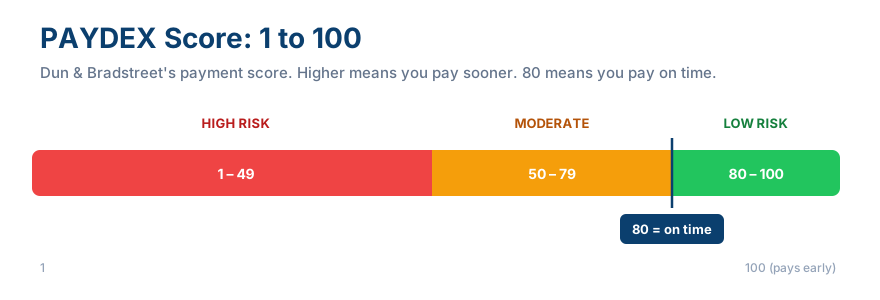
- 2.80 or above signals low risk, 50 to 79 is moderate, below 50 is high risk of late payment.
- 3.You can start checking it free through D&B's CreditSignal tool, which shows your scores for an initial window and then alerts you to changes.
- 4.You need a D-U-N-S number and a few reporting accounts before a PAYDEX score even exists to check.
Most business owners never check their PAYDEX score until a supplier suddenly tightens their terms or a lender comes back with a decline they cannot explain. That is the expensive way to find out. Your PAYDEX score is the single most-checked number in your business credit file, and confirming it takes about five minutes once your file exists. Here is exactly how to see it, read it, and use it.
What you need before a PAYDEX score exists
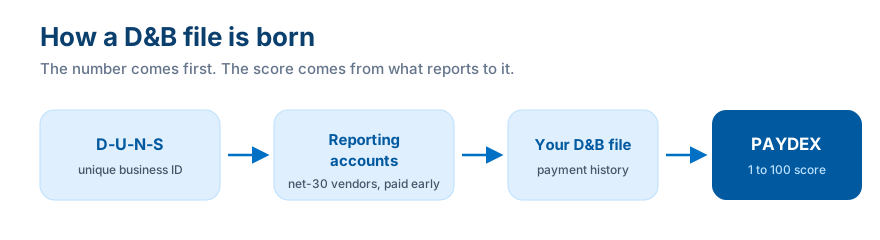
A PAYDEX score does not exist for a brand-new business. Two things have to be true first: your business needs a D-U-N-S number, which anchors your Dun & Bradstreet file, and you need at least a handful of trade accounts actually reporting payment experiences to D&B. If you check and see no score yet, that almost always means your reporting accounts have not posted enough history yet, not that anything is wrong.
How to check your PAYDEX score, step by step
- Confirm you have a D-U-N-S number. If not, request one free from Dun & Bradstreet first.
- Go to D&B's small business credit site and find the small business credit section.
- Start with CreditSignal, D&B's free tool. It shows your PAYDEX and several other D&B scores for an initial period, then alerts you to directional changes.
- Create your account and verify your business so D&B connects you to the correct file.
- View your PAYDEX score and note where it sits on the 1 to 100 scale.
- Decide whether to upgrade. Paid D&B products show additional scores and keep full visibility beyond CreditSignal's free window.
Start free
CreditSignal shows your PAYDEX plus several other D&B scores for an initial period, then notifies you when those scores change, at no cost. It is the fastest way to start watching your D&B file.
How to read what you see
PAYDEX runs 1 to 100, higher is better, and D&B groups it into three risk bands: roughly 80 to 100 is low risk, 50 to 79 is moderate, 1 to 49 is high risk. A score of exactly 80 means you are paying on the due date. Anything above 80 means you are paying early, since the PAYDEX scale is dollar-weighted, so larger accounts paid on time move it more than small ones.
Common mistakes
Expecting a score too early, checking only after a denial instead of proactively, assuming on-time is the ceiling instead of the floor, and ignoring the other D&B risk scores lenders may weigh alongside PAYDEX.
How this connects to building business credit
Checking your PAYDEX is the feedback loop that makes the rest of the work count. Open reporting accounts, pay early, check to confirm the score is actually responding, and if it is not, find out why before you apply for anything bigger. Company Base OS pairs the building side, which accounts and in what order, with the visibility side, what your file should look like at each stage, so you are never guessing.
Business Fundability Score Calculator
How set up is your business foundation?
How many accounts are reporting to the business bureaus?
Where is your payment history / PAYDEX?
How many funding applications in the last 90 days?
Answer all four to see your estimated score.
Find out where you actually stand in 60 seconds
Take the free Business Fundability quiz. Answer seven questions and get your score out of 100, your single biggest blocker, and the exact first move to fix it.
Get my free Fundability ScoreFrequently asked questions
How do I check my PAYDEX score for free?
Use Dun & Bradstreet's CreditSignal tool. It shows your PAYDEX and several other D&B scores for an initial period at no cost, then alerts you when they change.
What is a good PAYDEX score?
80 or above is the target. It means you are paying on time or early. 50 to 79 is moderate risk, and below 50 signals a pattern of late payment.
Why don't I have a PAYDEX score yet?
You need a D-U-N-S number and enough reporting trade experiences posted to your D&B file before a PAYDEX can be calculated. No score usually just means not enough history yet.
Does checking my own PAYDEX score hurt it?
No. Checking your own file is not a hard inquiry and does not affect your score. Only lender and supplier applications create inquiries.
Your PAYDEX score is not a report card, it is a dashboard. Check it on a schedule, not just after something goes wrong, and let it tell you whether the work you are doing is actually landing.
Company Base OS
Stop reading about it. Get your exact next move.
CompanyBase reads your business credit file and hands you the one account to open next, and the exact day to apply. Start with your free Fundability Score.
Get my free Fundability Score →60 seconds · no credit pull · founding access just $7 today
Company Base OS Research
Company Base OS is an educational platform that helps business owners build business credit and get funded, in the right order. Our team tracks lender and bureau criteria so you always know your exact next move.
← Previous
How to Dispute a Business Credit Report Error (All 3 Bureaus)
Next →
Business Credit Scores Explained: PAYDEX, Intelliscore, and FICO SBSS