
How to Get Your D&B File to Show Real Revenue (and Why an Empty One Is Costing You)
Two businesses, same size, same D-U-N-S number format. One gets real terms. One gets declined. The difference usually isn't payment history. It's a blank field D&B fills in with a guess.
Company Base OS Research
Updated August 28, 2026 · 9 min read
In this article
Key takeaways
- 1.D&B cannot calculate your full Rating (the number vendors and lenders actually check) without a financial statement on file.
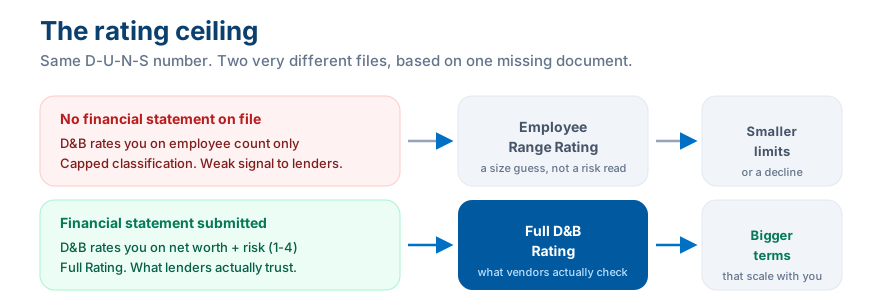
- 2.Without one, D&B falls back to rating you on employee count alone, a weak, capped substitute that caps how you're classified.
- 3.Submitting a financial statement is free, done through D&B's own D-U-N-S Profile Manager, not the paid CreditBuilder/Credit Insights tier.
- 4.You must be a verified owner, officer, or director to submit it. D&B checks this before it lets you touch your file.
Here is a scenario that plays out constantly in business credit. Two companies, same industry, same headcount, both with a D-U-N-S number and a couple of net-30 accounts reporting. One gets approved for real vendor terms and a decent starting limit. The other gets declined, or gets approved for a number so small it is barely worth the application. Same size business. Same payment history. Different outcome. The usual suspect is not fraud or bad luck. It is a single blank field on the D&B file: no financial statement.
The rating you have right now is probably a guess
D&B's headline number is not PAYDEX. PAYDEX only measures how promptly you pay bills you already have. The number that decides how big a bet a new vendor or lender is willing to make on you is the D&B Rating, sometimes called the Composite Credit Appraisal: a financial strength classification (based on net worth) paired with a 1 to 4 risk score, where 1 means minimal risk and 4 means significant risk.
To calculate that rating honestly, D&B needs to see your actual financials. If you have never submitted one, D&B does not just leave the field blank. It assigns what is commonly called an Employee Range Rating, a size classification based purely on your headcount, because headcount is the only number it has. A business with 3 employees and $40,000 in the bank looks identical, on paper, to a business with 3 employees and $4 million in receivables. D&B is not being lazy. It is rating you on the only data you gave it.
This is not the same thing as PAYDEX
Paying your net-30 vendors early still matters and still builds your PAYDEX score. That's a separate number from the Rating discussed here. You can have a strong PAYDEX and still be sitting on a headcount-only Rating that quietly caps what you get approved for.
This is free. Do not confuse it with D&B's paid tier
D&B sells CreditBuilder and Credit Insights subscriptions, priced from about $499 to $1,999 a year, built around letting you submit trade references yourself. That is a real product, and a separate decision. Read our breakdown of whether D&B CreditBuilder is worth it before you pay for anything. Submitting a financial statement is different: it lives inside D&B's free D-U-N-S Profile Manager, the same free tool you likely used to get your D-U-N-S number in the first place. No subscription required.
How to actually submit it
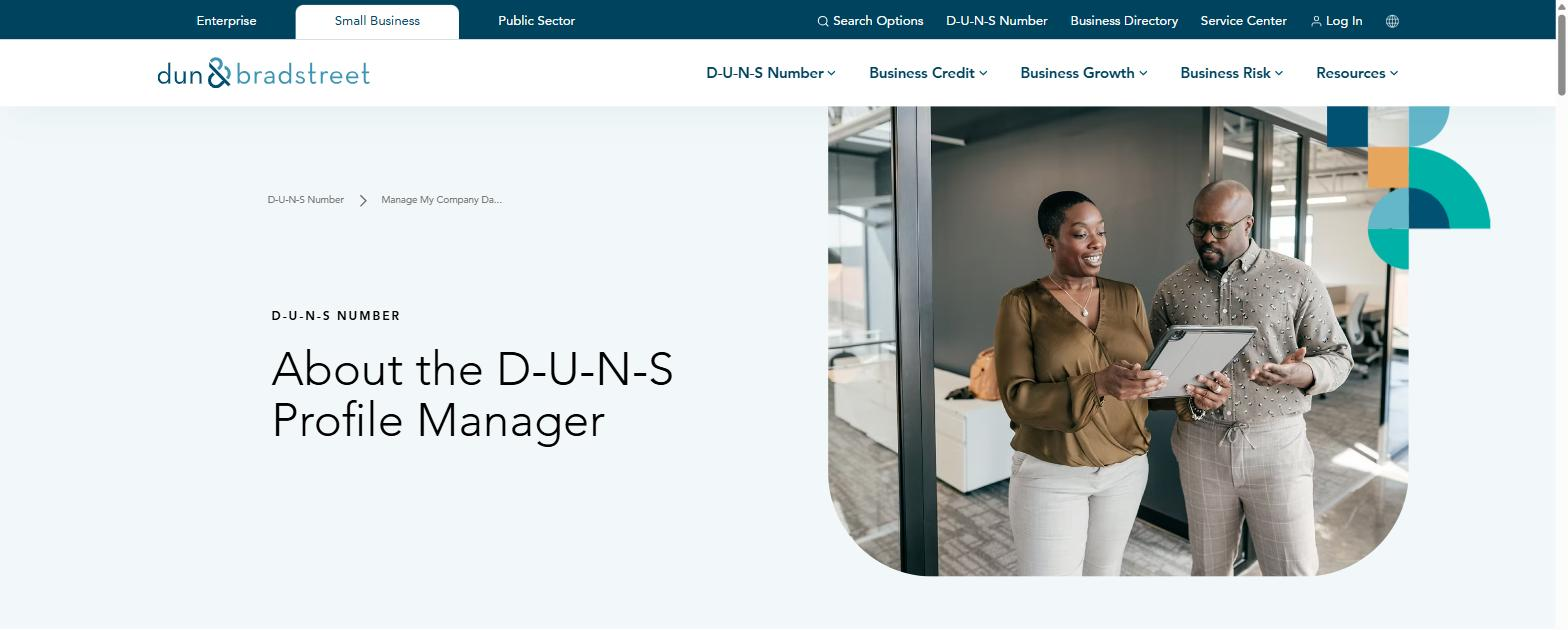
- Go to D&B's D-U-N-S Profile Manager (search "D-U-N-S Profile Manager" or find it under D&B's D-U-N-S Number menu) and choose to view or update your company information.
- Search for your business by legal name and address, exactly as it appears on your state filing and bank account. Mismatches here are the same silent-denial trap that trips up D-U-N-S applications.
- Verify your identity. D&B requires this step to confirm you are a current owner, officer, or director of the business before it lets anyone touch the file.
- Once you are in, look for the option to submit or upload a financial statement. A basic profit and loss and balance sheet, even a simple one, is enough for D&B to move you off the headcount-only classification.
- Give it time to process, then check your D&B report again. Combined with reporting tradelines, this is what moves you toward a real Rating instead of a guess.
Do this alongside your foundation, not instead of it
A financial statement fixes the Rating. It does not create tradelines and it will not move PAYDEX by itself. Pair it with net-30 accounts that actually report, and keep every field on your file (name, address, phone) identical everywhere.
One more thing worth knowing before you do this: D&B is a private company, not a government office, and it profits from selling access to and services around the same file you are updating for free right now. Update your information because an accurate file helps you, not because anyone is entitled to a fee for it.
Business Fundability Score Calculator
How set up is your business foundation?
How many accounts are reporting to the business bureaus?
Where is your payment history / PAYDEX?
How many funding applications in the last 90 days?
Answer all four to see your estimated score.
Find out where you actually stand in 60 seconds
Take the free Business Fundability quiz. Answer seven questions and get your score out of 100, your single biggest blocker, and the exact first move to fix it.
Get my free Fundability ScoreFrequently asked questions
Does submitting a financial statement to D&B cost money?
No. Submitting your financials through D&B's D-U-N-S Profile Manager is free. The paid CreditBuilder / Credit Insights tiers are a separate product built around letting you submit trade references, not financial statements.
Will this raise my PAYDEX score?
No. PAYDEX is calculated from how promptly you pay reporting accounts. A financial statement affects your D&B Rating (financial strength and risk classification), a different number. You need both a clean payment history and a submitted financial statement for a strong overall file.
Who is allowed to submit financials to D&B?
Only a verified current owner, officer, or director of the business. D&B runs an identity verification step before granting access to update the file.
What if my business is too new to have real financials?
Submit what you have, even a simple starting balance sheet. An early, honest statement still moves you off a pure headcount guess. Update it again as your numbers grow.
Company Base OS
Stop reading about it. Get your exact next move.
CompanyBase reads your business credit file and hands you the one account to open next, and the exact day to apply. Start with your free Fundability Score.
Get my free Fundability Score →60 seconds · no credit pull · founding access just $7 today
Company Base OS Research
Company Base OS is an educational platform that helps business owners build business credit and get funded, in the right order. Our team tracks lender and bureau criteria so you always know your exact next move.
← Previous
7 Business Credit Hacks That Actually Raise Your Limits Fast
Next →
LLC vs. Sole Prop: Which Actually Builds Business Credit Faster